How to Choose BJJ Gym Management Software
By iRoll BJJ Updated
Choosing gym software can be a pain when every demo promises to automate your admin and every feature list starts to look the same. The real test is pretty simple: can a coach check in twenty students before class, can you spot a failed payment without opening three systems, and will members actually use it?
The best option isn’t necessarily the platform with the most features. It’s the one that handles the awkward, repetitive jobs your academy deals with every week and actually frees up more of your time. You also want something that can grow with the academy. Switching again in a couple of years is rarely worth the disruption, but that doesn’t mean buying a complex system for a version of the business you may never become.
For a small academy, that may mean reliable billing, a clear timetable and quick check-in. A larger academy may also need staff permissions, lead management and consistent processes across several locations. Either way, start with your academy’s problems, test the workflows that matter and compare the full cost. The vendor’s feature checklist can wait. If you’re still clarifying which jobs software should take on, see what BJJ gym management software should actually do.
Start with the problems you need to solve
If your current system involves a spreadsheet, a payment dashboard, three WhatsApp chats and whatever the head coach happens to remember, don’t begin by shopping for features. Write down the recurring jobs that consume time or cause headaches. Be specific. If you’re still deciding whether the spreadsheet is a nuisance or a genuine operational problem, see when to switch from spreadsheets to BJJ gym management software.
“We need better member management” is too vague. Useful requirements sound more like:
- We need to know whether someone has an active membership when they check in.
- Members need to see timetable changes without messaging a coach.
- We need to spot failed recurring payments promptly.
- Coaches need to record attendance quickly.
- New website enquiries need to reach the person responsible for follow-up.
This turns the buying process around. Instead of asking whether a platform has a “membership module”, ask the vendor to show exactly what happens when a member’s payment fails or a coach changes Wednesday’s no-gi class. You learn far more from watching a real task than from being told a feature exists.
Put each requirement into one of three groups:
- Essential now: the academy can’t operate properly without it.
- Useful now: it would save time, but you have a workable alternative.
- Likely later: you expect to need it as the academy grows.
Keep the first group short. If everything is essential, you’ve recreated the vendor’s feature list in your own document.
Evaluate the five areas that matter most
Once you’ve established what you’re trying to fix, assess these five areas. Follow one fictional student from enquiry to trial, membership, payment and check-in to see whether the features actually work together.
1. Members and BJJ-specific records
On a busy evening, a member profile should quickly show who the student is, whether their membership is active, when they last trained and their rank. Staff shouldn’t need to investigate across several screens.
Check how it handles active, trialling, paused and former members; emergency details; waivers; attendance; and staff access. A useful member record should keep belt rank, stripes and promotion history alongside those details.
2. Memberships and billing
Billing needs to work when things go wrong as well as right: changing a plan, pausing an injured member, following up a failed payment and cancelling without another charge. For the operational side of running that lifecycle day to day, see how to manage BJJ gym membership payments.
Ask where funds are held, which processor is used and what processing or platform fees apply.
If you switch systems later, moving names and emails is usually simpler than moving stored payment credentials and active subscriptions. Stripe’s official data migration guidance shows that payment migration can involve both your old provider and the new processor. Ask what is supported before you commit, not when you’re trying to leave.
3. Timetable, check-in, attendance and grading
Picture the ten minutes before evening class: the mats are filling up and the coach is trying to start on time. Check-in must work in that moment without turning staff into front-desk support.
Test self-check-in, a front-desk device or coach-led attendance. Check what happens when somebody has no active membership, isn’t eligible or forgets to check in. If you don’t require bookings, don’t accept a forced booking workflow.
The timetable should also be easy to update in one place. If changing Saturday’s open mat still means editing the app, website and social media separately, the system has digitised the problem rather than solved it.
A timetable answers when people train. If several coaches teach the same programme, also test how the software connects curriculum and lesson planning to those classes. The useful question is whether a coach can see what comes next and leave an accurate record of what they covered. For the operational approach behind that, see how to build and run a BJJ curriculum across multiple coaches.
A row of check-in totals isn’t especially useful on its own. Attendance data earns its keep when it helps you notice a regular student drifting away or gives coaches better context before a grading discussion. For the practical side of recording who trained, see how to track attendance at a BJJ gym. For turning those drops into a weekly follow-up habit, see BJJ member retention: how to spot students at risk of leaving.
Can you see recent patterns rather than just lifetime visits? Can coaches review attendance beside promotion history? Software can provide evidence, but it shouldn’t pretend to replace coach judgement. For the operational side of keeping that history, see how to track BJJ belt and stripe promotions.
4. Leads and useful reporting
A new enquiry shouldn’t vanish because everyone assumed somebody else had replied. Track where it came from, who owns it, whether the prospect attended a trial and whether they joined. For the operational side of that journey, see how to turn BJJ trial students into paying members.
Test website enquiry forms from a phone and see who gets notified. A smaller academy may benefit more from a simple process staff follow than a complicated CRM.
Reports should lead to an action. A dashboard can contain a heroic number of charts and still leave you unsure what to do on Monday morning.
Ask the vendor to show which payments need attention, whose attendance has dropped, how many leads became members and what revenue was collected or refunded. Confirm how figures are defined: “active member” and “monthly revenue” can mean different things in different systems.
5. Everyday use, data and support
Academy software is only effective if people use it. That sounds obvious, but a smooth owner demo says little about whether a member can find Friday’s class or a tired coach will record attendance at the end of the night.
Members should be able to find the timetable, check in and understand their membership without a tutorial. Coaches need the right access without seeing private financial records.
You are also trusting the provider with personal information and important workflows. Ask:
- Can access be limited by role?
- What support is available when billing or check-in goes wrong?
- Can you export member, attendance and promotion data in a usable format?
- What happens to your data when the contract ends?
In practice, that usually means choosing software that routes card payments through a proper processor such as Stripe, so your academy never stores card numbers itself. You still need sensible staff access controls and should understand who handles the payments. The PCI Security Standards Council’s guidance on third-party payment providers is a useful starting point. Privacy and record-keeping obligations vary by country, so seek appropriate advice where needed.
Compare the full cost, not just the subscription
The true cost is often more than the advertised basic price. Alongside the monthly fee, add card-processing charges, extra fees for additional coaches or academy locations, setup and training, migration help, and any charges to cancel or export your data. Include a tablet or kiosk if you need one for check-in.
Savings vary between providers too. A system that covers more of your day-to-day work may let you cancel other tools and reclaim time that currently goes on admin. A cheaper subscription is less attractive if you still need three other apps and a Sunday evening of spreadsheet work to keep things running.
Don’t assume the most comprehensive package offers the best value. A 60-member academy may be better served by a focused system that handles five important workflows well. A 250-member academy with several administrators can justify more configuration if it creates a consistent process and clearer accountability.
Use a weighted scorecard
A scorecard isn’t the most exciting part of opening a BJJ academy, but it helps stop a polished demo and a likeable salesperson from outweighing your actual requirements.
Assign each area a weight totalling 100, then score every product from 1 to 5. For example:
| Area | Example weight |
|---|---|
| Memberships and billing | 25 |
| Member records | 15 |
| Timetable, attendance and grading | 25 |
| Member and coach experience | 15 |
| Leads and reporting | 10 |
| Migration, support and security | 10 |
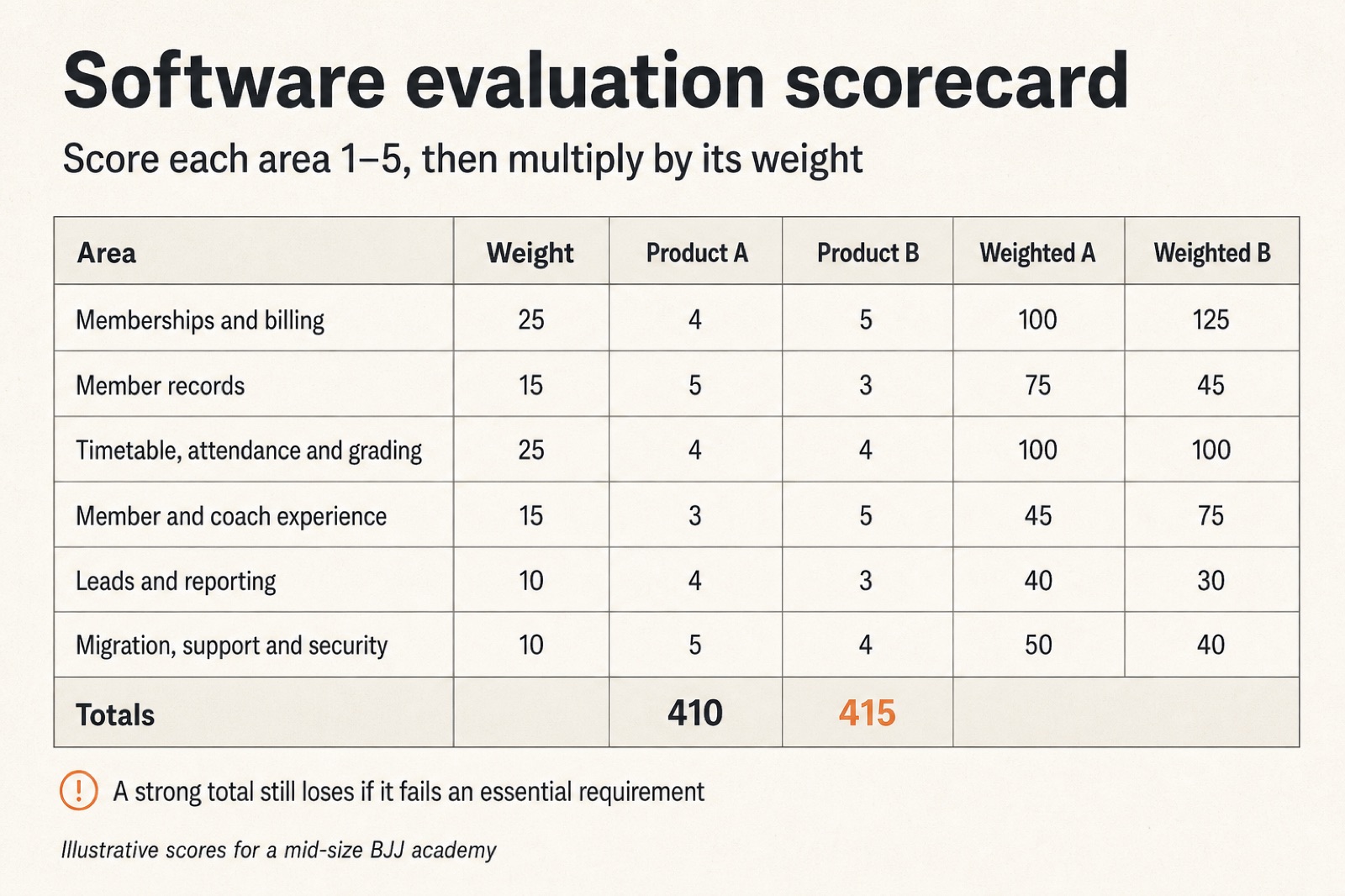
Multiply each score by its weight and compare the totals. The numbers won’t make the decision, but they expose trade-offs. A product that fails one essential requirement can still be unsuitable despite a good total, so keep those requirements as a separate veto.
Use the same scenarios and questions for each vendor. Otherwise, you are comparing one provider’s billing demonstration with another provider’s timetable demonstration.
Trial the software and plan the move
Don’t spend the trial period browsing menus during a quiet hour and declaring the system easy to use. Recreate a small but complete version of your academy.
Add an adult member, a child on a family account, a trial student, a paused member and someone with a failed payment. Run a real check-in, ask a coach to record attendance and test the member experience on a phone.
Log what was easy, what required support and which duplicate tasks remained. Run the trial during an ordinary week if possible; a workflow feels different when twenty students arrive before class.
Migration isn’t the exciting part of buying software, which is precisely why it gets left until too late. Before signing, list what must come across: member profiles, memberships, payment arrangements, waivers, attendance, ranks, promotion history and communication preferences.
Ask:
- What can be exported and imported?
- Who cleans and maps the data?
- Can subscriptions move without members entering payment details again?
- How will imported data be checked for accuracy and errors?
- What happens if billing or access is wrong?
Run checks before you cancel the old system. Compare member counts, active memberships and payment totals, then inspect a sample of individual records. Keep the transition boring. In this context, boring is a compliment. Avoid changing prices, policies and software on the same day unless there is a strong reason.
A practical recommendation by academy size
For a small academy where the owner still handles most administration, I’d prioritise ease of use, reliable billing, member records, timetable and check-in. Avoid buying complexity for an imagined future academy while today’s admin remains awkward.
For a growing academy with several coaches, add staff permissions, consistent lead follow-up, attendance-based retention signals and clearer reporting. The goal isn’t to collect more features. It’s to stop routine work depending on one person remembering everything.
For a larger or multi-location academy, examine data separation, cross-location memberships, reporting, role design, integrations and support in much more detail. Ask the provider to demonstrate your structure rather than assuming a location selector solves every operational difference.
Whatever your size, the final choice should pass three tests:
- It solves your essential problems today.
- Coaches and members can use it under normal conditions.
- You understand the cost and the process for getting your data in and out.
Where iRoll BJJ fits
iRoll BJJ is BJJ gym management software built specifically for academy workflows, including member management, membership billing through Stripe, class scheduling and check-in, curriculum and lesson planning, belt and stripe tracking, lead management and a member app.
That BJJ focus may be valuable if you want attendance, memberships and promotion records to work together without forcing BJJ into a generic fitness template. It doesn’t give iRoll BJJ a free pass. Put it through the same trial, awkward scenarios and cost comparison as every other option, then choose the system that fits your academy.
Questions to ask in every software demo
Use the same shortlist in every demo:
- Show me a new enquiry becoming a paying member.
- Show me what staff and the member see when a recurring payment fails.
- Show me a timetable change and a busy-class check-in.
- Show me what a coach can access compared with an owner.
- Show me a member’s attendance and promotion history.
- Show me how I import and export my academy’s data.
- Explain every charge we would pay in a typical month.
- Explain what happens if we decide to leave.
A provider should be able to answer these with the product, not only with promises about what is planned.