Stripe for BJJ Gyms: How It Works and What Gym Owners Should Know
By iRoll BJJ
Stripe lets a BJJ gym take card and bank payments online. It can collect recurring membership fees, one-off drop-in payments, private-lesson fees and merchandise sales.
What Stripe does not do by itself is manage your academy. It processes money; your BJJ gym management software should connect each payment to the right member, plan and membership status.
That distinction matters. A successful charge is useful. Knowing who paid, who is past due and who should still have access to class is what saves the admin headache.
If you’re copying those answers from Stripe into a separate member sheet, this guide explains when it makes sense to replace spreadsheets with BJJ gym management software.
How Stripe works for a BJJ gym
A typical recurring membership works like this:
- Your academy creates a Stripe account and links its bank account.
- You create membership plans in Stripe or your gym software.
- A member chooses a plan and enters their payment details through a secure checkout.
- Stripe takes the first payment and charges again at the agreed interval.
- The money enters your Stripe balance, minus applicable fees, before being paid out to your bank.
- Your gym software updates the member’s subscription status when a payment succeeds or fails.
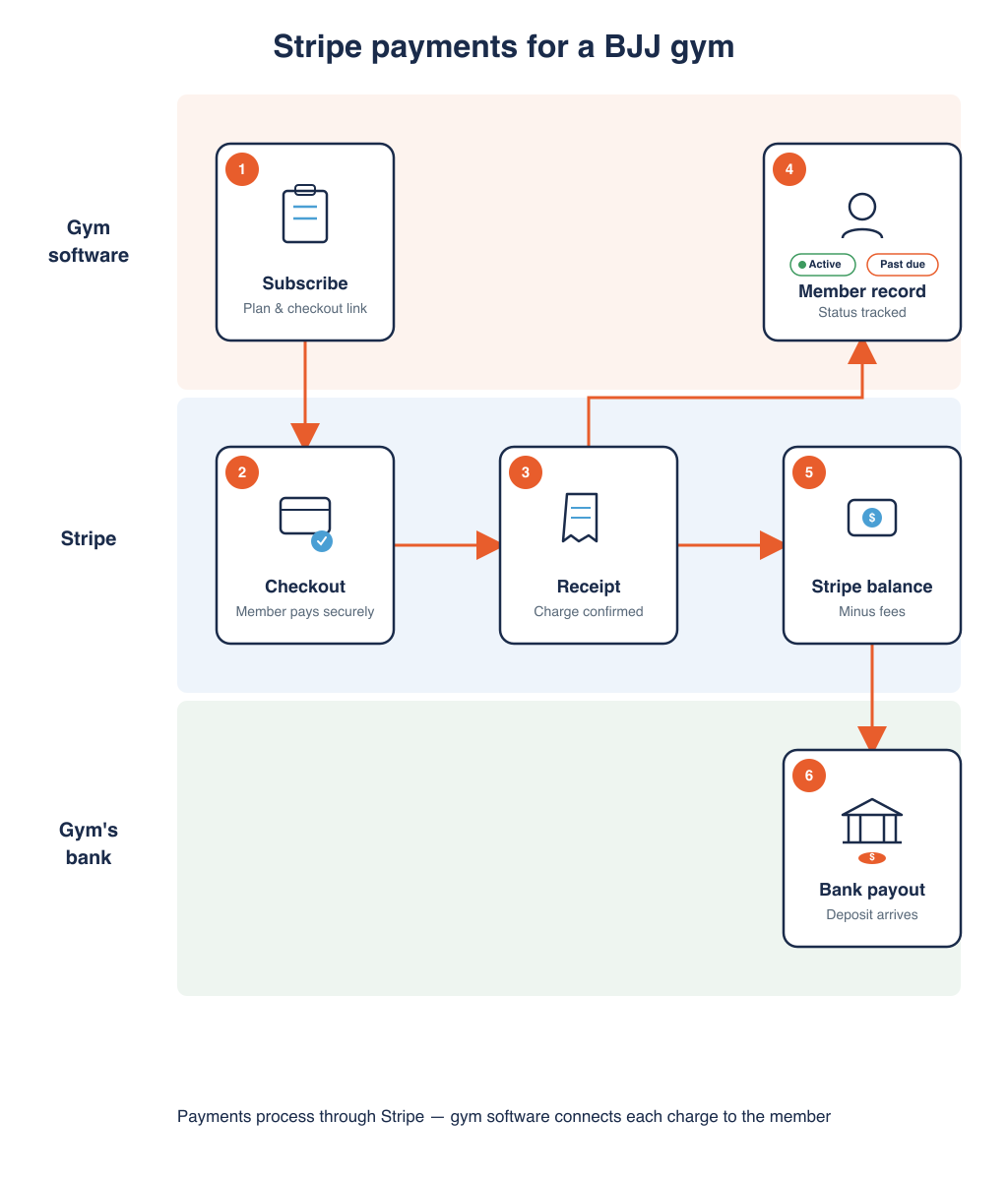
Stripe creates invoices and manages subscription states for recurring payments. A good integration turns those states into something useful at the academy: active, past due, unpaid or leaving.
The academy should own or control the connected Stripe account. Check this before choosing software. You should be able to see payments and payouts, update bank details and retain a usable payment history if you later change systems.
What can a BJJ academy collect through Stripe?
Stripe can support more than monthly memberships:
- recurring adult, kids and family memberships;
- annual plans;
- paid trials or introductory offers;
- one-off drop-in payments;
- class-credit and private-lesson packages;
- academy shop purchases;
- grading, seminar or other one-off fees.
Your software integration decides which of these are available and how they appear against a member. Stripe may be capable of a payment method or billing model that your gym software does not support, so check both rather than assuming.
How much does Stripe cost a BJJ gym?
Stripe fees depend on your country, the payment method, the card’s origin and the Stripe products used. Some gym software adds its own transaction fee; iRoll BJJ does not.
For example, a $100 recurring membership paid by ACH would have these fees under Stripe’s standard US pay-as-you-go pricing on 1 September 2026:
| Fee | Rate | Cost on $100 |
|---|---|---|
| ACH Direct Debit processing | 0.8% | $0.80 |
| Stripe Billing | 0.8% | $0.80 |
| iRoll BJJ transaction fee | 0% | $0.00 |
| Total | 1.6% | $1.60 |
The processing fee covers collecting the payment — bank and network costs along the way, plus Stripe’s cut for handling it. On card payments, most of that fee goes to the member’s bank and card network rather than to Stripe. The Stripe Billing fee covers the recurring subscription, invoices, payment status and retries when a charge fails.
Check Stripe’s current US payment pricing and Stripe Billing pricing, or select your country. Card payments usually cost more than bank debits, and international cards can add extra fees on top of the rates above.
Do the calculation using your real membership mix. Saving a few cents per payment is little use if failed memberships go unnoticed and cost the academy more in lost revenue.
What happens when a membership payment fails?
Failed payments are normal. Cards expire, banks decline charges and members occasionally have an expensive week.
Stripe can retry recoverable subscription payments automatically. Its Smart Retries choose when to try again within rules set for the account. Some failures still need the member to replace their payment method or approve a payment.
Your academy still needs a simple policy:
- Tell the member promptly and give them a direct way to update payment details.
- Decide whether they can train during a short grace period.
- Review payments that remain past due after the retries finish.
- Keep the tone friendly. A failed card is not a character assessment.
Stripe handles the charge attempts. Your gym software should make the problem visible before the member is standing at the door in a rashguard.
Are Stripe payments secure?
Stripe Checkout sends payment details directly to Stripe rather than through the gym’s own server. This reduces the amount of sensitive card data your academy or software provider handles.
It does not make security somebody else’s problem entirely. PCI compliance is a shared responsibility. Protect your Stripe login with multi-factor authentication, give staff only the access they need and never ask members to send card details by email, message or paper form.
If a member needs to change a card, send them the payment-update link. Do not ask for their card number in a message.
Payments, receipts and payouts
When a member pays successfully, Stripe can send them a receipt straight away. That confirms the charge — but it is not the same as money landing in your bank account.
The payment first appears in your Stripe balance, minus fees. Stripe then pays available funds to your linked bank account on your payout schedule. A member may have their receipt today while your bank deposit arrives a few days later, depending on your country and account. New accounts may have a longer first wait, but after that first payout lands, later ones usually follow your normal schedule without the same delay.
Refunds, cancellations and disputes
A refund sends money back for a payment already taken. Cancelling a subscription stops future renewals. They are separate actions.
If a member leaves, make sure the subscription is cancelled even when you also refund them. If you only issue the refund, next month’s charge may still run.
A dispute happens when a member challenges a payment through their bank. Stripe normally removes the disputed amount and charges the applicable dispute fee while the case is handled. Clear membership terms, recognisable statement details and records of the member’s agreement help prevent avoidable disputes.
Can you keep Stripe when changing gym software?
Sometimes. Having your own Stripe account is better than starting from zero, but an existing account does not guarantee that subscriptions will move neatly into new software.
Ask the new provider:
- Can it connect your existing Stripe account?
- Can current subscriptions remain active?
- Will members need to enter payment details again?
- Who handles the migration and verifies the totals?
- What payment and payout history remains available?
Moving names and email addresses is easy. Moving active subscriptions is the part to plan. Stripe’s data migration guidance explains why the old provider, new provider and Stripe may all need to be involved.
How Stripe works with iRoll BJJ
iRoll BJJ connects each academy to its own Stripe account, but member payments do not pass through iRoll BJJ. Stripe processes the charge, and the money goes into the academy’s connected Stripe account before Stripe pays it out to the bank. iRoll BJJ does not hold membership revenue.
iRoll BJJ integrates closely with that Stripe account instead. You can set pricing and membership plans in iRoll BJJ, send members to Stripe Checkout to pay, and track each payment on the member record — active, past due, unpaid, and so on. Refunds, cancellations and plan changes can be handled from iRoll BJJ rather than logging into Stripe for every admin task.
Owners and admins can also use Stripe for one-off Payment Requests, shop purchases, class credits and private lessons where those features are enabled.
Membership billing in iRoll BJJ keeps the payment result beside the member rather than leaving it alone in a processor dashboard. Standard Stripe fees apply.
Frequently asked questions
Is Stripe suitable for a small BJJ gym?
Yes. There is no minimum academy size, and automated recurring payments can help even when the owner handles all the admin. Compare the total fees with the time and missed payments involved in collecting cash or transfers manually.
Does Stripe replace BJJ gym management software?
No. Stripe processes payments and subscriptions. Gym software connects those payments to members, waivers, attendance, plans and access.
Does Stripe hold a BJJ gym’s money?
Payments first enter the academy’s Stripe balance and are then paid out to its linked bank account. The timing depends on the account and payout schedule.
Can members pay by Direct Debit through Stripe?
Stripe supports bank-debit methods in several countries, including BACS Direct Debit in the UK and ACH Direct Debit in the US. Availability still depends on the academy’s country and what its gym software integration supports.
The short version
Stripe is a strong payment engine for a BJJ gym, but the useful setup is Stripe plus academy software that keeps billing status attached to the member.
Before committing, check the full fees, account ownership, failed-payment process, payout access and migration options. Then set payments up to run quietly in the background. There is enough excitement on the mats already.