How to Manage Leads and Enquiries for a BJJ Gym
By iRoll BJJ
A prospective student emails the academy, sends an Instagram message and fills in the website form because they are unsure which channel the academy actually checks. A coach replies on social media, the owner answers the email two days later and neither records that a trial is already booked.
The problem is not getting enquiries. It is keeping track of them.
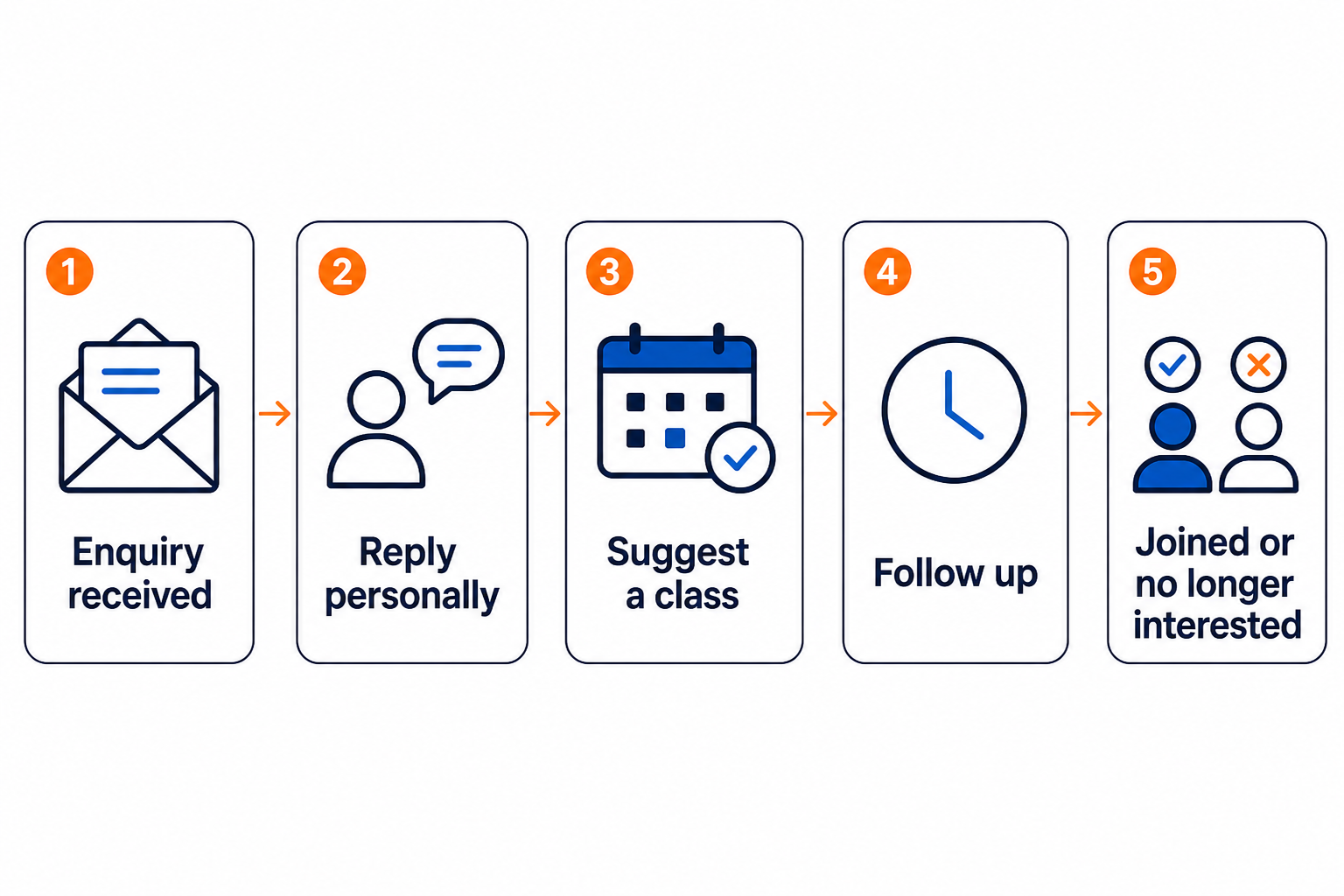
You do not need a complicated sales system. Keep every enquiry in one place, make sure someone responds and note what happens next.
Decide what counts as a lead
A lead is someone who has asked about training but has not joined yet, whether they came through your website, phone, social media or a referral. Do not include followers or subscribers who have not enquired.
Bring every enquiry into one shared place
Enquiries are easily missed when website forms, social messages, calls and referrals live in different places. Keep one lead list with each person’s contact details, what they asked, who is replying and what happens next.
“Sam wants to try Thursday beginners; confirm on Wednesday” is useful. “Spoke to Sam” is not. If possible, send website enquiries straight to the list rather than copying them across by hand.
Give every new lead an owner
If everyone can see an enquiry but nobody is responsible for it, it can still be missed. Give each lead to a named person or whoever is on duty. The owner may handle this in a small academy; a larger gym may need a rota and cover for absences.
Reply promptly while the person’s interest is fresh. When nobody is available, an automatic acknowledgement can say when someone will respond, but it cannot replace a personal reply from someone who genuinely wants to help them get started.
Make the first reply useful
A good first reply should answer their question and help them choose a class. Use their name and ask anything you need to know — for example, whether the enquiry is for an adult or child and whether they have trained before. Then suggest a class and ask if the date suits them.
“Come down whenever” sounds relaxed, but it leaves them to work out which class suits them and message again when they choose a date.
“Our adult fundamentals class is Tuesday at 6:30. No experience is needed and normal sports clothes are fine for the first session. Would you like me to book you onto this Tuesday or next Tuesday?” is easier to act on.
A saved reply can cover details such as parking, clothing and arrival time, but the class you suggest should suit the person.
Track a next action, not just a status
Statuses make a lead list easier to scan. A simple set of stages might be:
- New — received but not yet handled.
- Contacted — a real reply has been sent or a conversation has happened.
- Trial arranged — a suitable class and date have been agreed.
- Trial attended — the person completed their first class.
- Invited to join — they know which membership suits them and how to sign up.
- Converted — they joined.
- Lost — they declined, chose another academy or did not respond after reasonable follow-up.
Your software may use different labels. What matters is that everyone at the academy uses them in the same way.
The status tells you where things stand. For every open enquiry, you should also know what needs doing, who will do it and when. That might mean confirming tomorrow’s trial, following up after a missed class or sending the signup link you promised.
Without a next action, “contacted” easily becomes a polite name for forgotten.
Follow up without becoming a nuisance
People often forget to reply or need time to check their plans. One unanswered message does not necessarily mean they are uninterested.
Use short follow-ups that make the next step easy. Refer to the original conversation and offer a useful choice:
Hi Alex — just checking whether Tuesday fundamentals still suits you. Thursday at 6:30 is also beginner-friendly if that works better.
If someone booked but did not attend, ask whether another class would work. After a reasonable number of attempts, mark them as lost or not currently interested. They can always return later.
For advice on the trial itself, read how to turn BJJ trial students into paying members.
Check new enquiries promptly and review the process regularly
Check these things each day:
- Which new enquiries still need a reply?
- Which trials need confirming?
- Which promised follow-ups are due today?
- Does tonight’s coach know who is expected?
Once you have enough enquiries to spot a pattern, look at where people are dropping out:
- How many new enquiries arrived?
- Where did they come from?
- How many received a response?
- How many arranged a trial?
- How many attended?
- How many became members?
- Which enquiries still need following up?
Do not worry about industry averages you cannot verify. Track your own numbers and see where people are getting stuck.
If enquiries receive replies but few trials are arranged, look at whether you are suggesting a suitable class. If people book but do not appear, improve the confirmation and information you send before class. If they attend but do not join, look at the trial experience and how you ask them to join.
It is also worth noting where enquiries came from. Knowing whether someone found you through your website, a referral or a campaign can help you decide where to spend your time and money.
Only collect what you need
Collect only what you need to answer the enquiry and arrange a class. Keep the lead list private, explain how you will use their details and decide when old records should be deleted. Privacy rules vary, so check what applies to your academy.
When someone joins, turn their lead into a member record instead of keeping two separate copies. If they do not join, do not keep their details forever simply because your system allows it.
Where iRoll BJJ fits
Lead management in iRoll BJJ lets you add an enquiry form to your existing academy website and keep submissions in one lead list. The academy receives email and push notifications, while the person enquiring can receive an acknowledgement.
Each lead can include their contact details, message and source, along with academy notes and a status of new, contacted, invited, converted or lost. When the person is ready to join, you can send an academy invitation from the lead record rather than re-entering their name and email. The weekly academy summary also keeps open leads visible for follow-up.
The system does not reply to the person or choose their first class. It keeps the details in one place so nothing depends on somebody remembering to check a crowded inbox.
Once they join, you can manage their details through member management and collect their fees through membership billing. If you are comparing platforms, how to choose BJJ gym management software explains what else to look for.
Frequently asked questions
What information should a BJJ gym collect from a new enquiry?
Start with their name, contact details and enough information to suggest the right class. For a children’s enquiry you may need their age, while previous experience can help with adult enquiries. Do not ask for a full member profile before they join.
How quickly should a BJJ gym reply to an enquiry?
As soon as practical while they are still thinking about it. If nobody is available, send an acknowledgement telling them when someone will reply.
Do I need specialist software to manage BJJ leads?
No. A shared list can work when enquiries are low. Software helps once several people need to see new enquiries, update their status and turn them into member records.
Make sure every enquiry is dealt with
Keep enquiries in one place, make sure someone replies and update the list when they join or are no longer interested. That gives interested people a fair chance to reach the mats and stops old enquiries being forgotten.